How everything works
Blochworks is the app you use to work with Bob, your assistant. It runs on your Mac. Bob can help you write, find things, answer questions and, when you allow it, act on your behalf. This chapter explains each part in detail, one page per topic, so you can read just the parts you need.
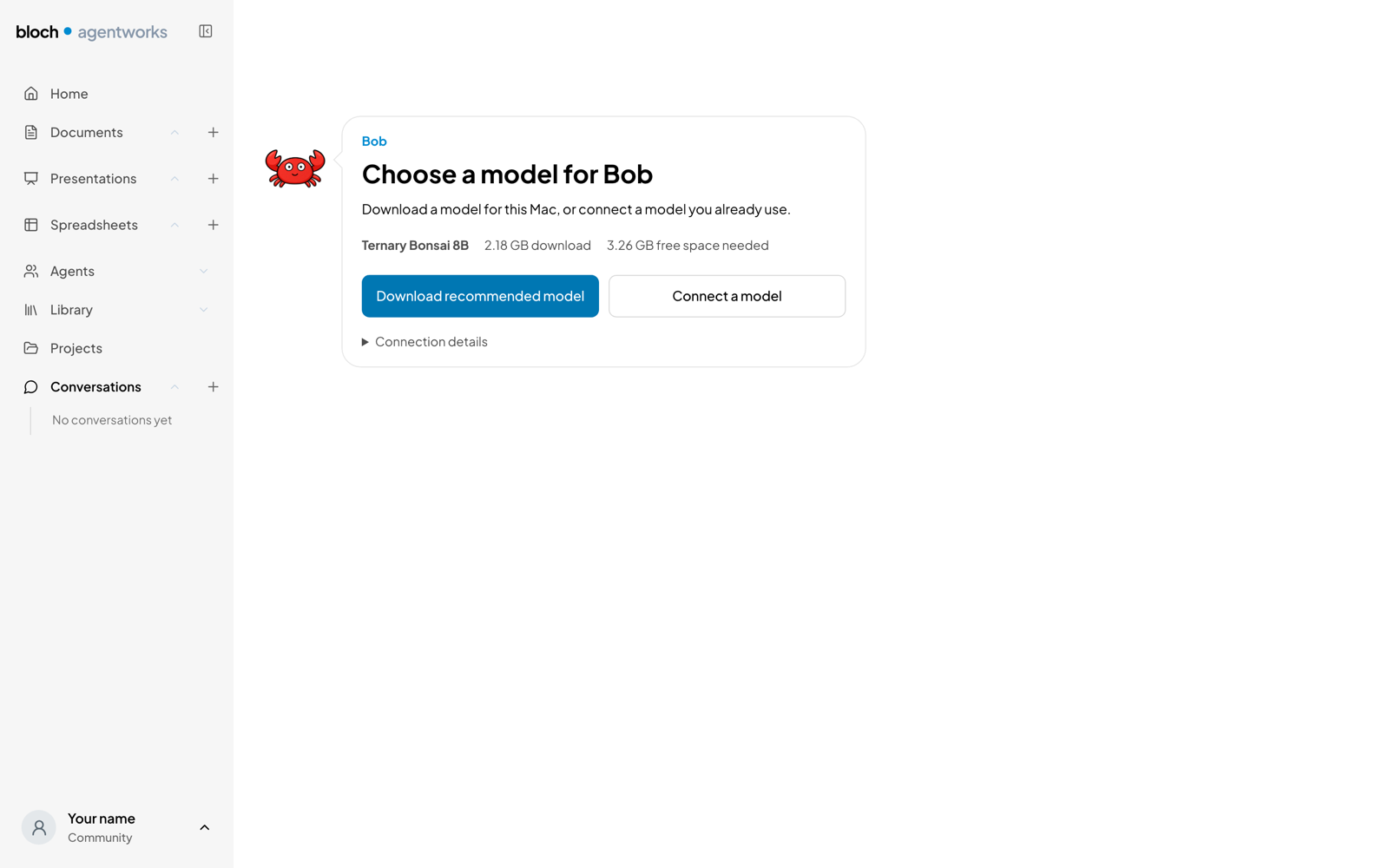 On first launch, Blochworks asks you to choose a model for Bob. The next page explains how.
Permissions, approvals and results
Review sends and changes
Bob can prepare drafts within the access you give him. Sending an ordinary email or message, changing a calendar or file, and submitting a browser form need one review of the exact action. If you change the action, you review it again.
Some work uses standing permission:
- A friend set to Automatic replies or acts within the permissions you gave, without a review of each message. Every file still needs your review before it is sent.
- Email me job results sends the results of a scheduled job to you without a review.
- Tool operations set to Runs without asking can run within their assigned permissions. Outside content or the connection’s approval settings can still require review.
- A first clean public search, page fetch or Browser navigation does not ask. After outside content has entered the conversation, a new outbound query or destination waits for review.
Approvals explains how the review works.
Choose where your data goes
A local model produces replies on your Mac. Other features can still contact outside services:
- messages and attachments you send to a cloud model you have connected;
- built-in web search queries. This is on by default. Your search words go to DuckDuckGo, for web results, and to Wikipedia. Blochworks refuses queries containing email addresses, long number sequences or recognised key-like patterns, but these checks cannot identify every private detail;
- web pages that Bob opens or fetches. The web address itself can carry text;
- the services you connect, such as Gmail or Outlook, Telegram, tool connections, and any outside memory or search service you have set up;
- model downloads from Hugging Face;
- coding programs you connect, which use their own services and permissions;
- remote browser access, if you enable it, which carries workspace data to your approved devices over Tailscale.
The desktop app has no usage telemetry and does not check for updates. Where your data goes explains the destinations and controls.
To turn built-in web search off, select Settings, then Tools, then Built-in web search, and turn off Use built-in search. Turning it off does not stop search services you have connected yourself, and it does not stop Bob opening web pages. Web search and the browser covers this in full.
Check the result of the action
Read the recorded outcome and the result itself. For an email or booking, check the provider’s confirmation when delivery matters. A model’s description of success is not a receipt from the service. Approvals explains uncertain outcomes and retries.
Tool access and task skills
New Bob agents start with Web Research, Word Document, Excel Workbook and PowerPoint Presentation Tool access. Browser actions, Obsidian and other operations require their own skills and any necessary connections. Task skills provide methods without granting tools. Each verified Friend identity receives only the help and eligible task methods you select. Skills and permissions explains the controls and what happens when access is removed.
Pages in this chapter
- Choosing a model for Bob: download a model that runs on your Mac, or connect a model service you already use.
- Chats and projects: how conversations, projects and attachments work day to day.
- Settings: a tour of every section of Settings, with a link to the page for each.
- Installing and updating: installing, first opening, updating safely and uninstalling.
- Your data and privacy: where your information lives, what protects it and how to back it up.
- Bob in your documents: working with Bob inside Word, spreadsheet and presentation documents.
- Files and library: attaching files, the Library, templates and importing files.
- Email and Telegram: connecting a mailbox or Telegram bot, and how drafts and sends work.
- Bob's friends: people Bob can talk to for you, and what each one may do.
- Memory: what Bob remembers, and how you approve, check and change it.
- Agents and scheduled work: creating agents, talking to them, and setting up and checking scheduled jobs.
- Skills and permissions: Tool access, Task skills, Bob's defaults and selected help for friends.
- Coding agents and tools: connecting coding agents and tool connections, and what each is allowed to do.
- Approvals: what needs your review, what does not, and how the review works.
- Web search and the browser: built-in web search, the browser Bob can use, and what each one sends or opens.
- Remote access: whether you can reach Blochworks from another device, and how it is approved.